SATA data cables play a crucial role in the functionality of modern computers, connecting storage devices like hard drives and SSDs to the motherboard. Understanding their significance, types, and applications can help users make informed decisions when upgrading or building a computer system. This article delves into the intricacies of SATA data cables, exploring their features, benefits, and common questions surrounding them.
Table of Contents
Understanding SATA Data Cables
What is a SATA Data Cable?
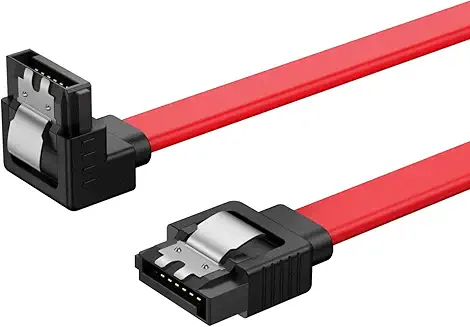
SATA, or Serial Advanced Technology Attachment, is a standard interface used for connecting storage devices to a computer’s motherboard. A SATA data cable is specifically designed to facilitate the transfer of data between these devices. Typically, a SATA data cable features a 7-pin connector on each end, which connects to the storage device and the motherboard. This design allows for a streamlined connection that minimizes the risk of data loss and enhances the overall efficiency of data transfer. The simplicity of the SATA interface has made it a preferred choice for both manufacturers and consumers, as it supports a wide range of devices and configurations.
The Importance of SATA Data Cables
SATA data cables are essential for several reasons. They enable high-speed data transfer rates, which are crucial for the performance of modern storage devices. With advancements in technology, SATA III cables can support data transfer speeds of up to 6 Gbps, significantly enhancing the overall performance of a computer system. This speed is particularly important for tasks that require rapid data access, such as gaming, video editing, and large file transfers. Additionally, the reliability of SATA connections ensures that data integrity is maintained, reducing the likelihood of corruption during transfers. As data storage needs continue to grow, the role of SATA data cables in facilitating efficient data management becomes increasingly vital.
Types of SATA Data Cables
SATA I, II, and III
SATA data cables come in different versions, namely SATA I, II, and III. Each version offers varying data transfer speeds. SATA I supports speeds up to 1.5 Gbps, SATA II up to 3 Gbps, and SATA III up to 6 Gbps. While newer devices typically use SATA III cables, it is important to note that these cables are backward compatible with older SATA versions. This compatibility allows users to upgrade their systems without needing to replace existing cables, making it easier to transition to newer technologies. Understanding the differences between these versions can help users select the appropriate cable for their specific needs, ensuring optimal performance from their storage devices.
Straight vs. Right-Angle Connectors
SATA data cables are available with straight or right-angle connectors. Straight connectors are ideal for straightforward connections, while right-angle connectors are beneficial in tight spaces, allowing for better cable management and airflow within the computer case. The choice between these connector types can significantly impact the overall aesthetics and functionality of a computer build. Right-angle connectors can help reduce strain on the cable and prevent damage, especially in compact cases where space is limited. By selecting the appropriate connector type, users can enhance both the performance and appearance of their systems.
How to Choose the Right SATA Data Cable
Length Considerations
When selecting a SATA data cable, the length is a critical factor. Cables typically range from 18 inches to 3 feet. It is essential to choose a length that allows for a tidy setup without excessive slack, which can hinder airflow and create clutter. Longer cables may be necessary for larger cases or specific configurations, but they can also introduce signal degradation if they exceed recommended lengths. Users should measure the distance between their storage devices and motherboard to ensure they select a cable that fits their setup perfectly. A well-organized cable management system not only improves airflow but also makes maintenance and upgrades easier in the future.
Quality and Shielding
The quality of the SATA data cable can significantly impact data integrity and transfer speeds. Look for cables that feature shielding to reduce interference and ensure stable data transmission. High-quality cables often come with locking latches to secure the connection, preventing accidental disconnections. Investing in premium cables can lead to better performance and longevity, as they are designed to withstand wear and tear over time. Additionally, reputable manufacturers often provide warranties for their products, offering peace of mind for users concerned about reliability. By prioritizing quality, users can enhance their overall computing experience and minimize potential issues related to data transfer.
Installing SATA Data Cables
Step-by-Step Installation Guide
Installing SATA data cables is a straightforward process. Begin by powering down the computer and unplugging it from the electrical outlet. Open the computer case and locate the SATA ports on the motherboard. Connect one end of the SATA data cable to the storage device and the other end to the motherboard. Ensure that the connectors are firmly seated in their respective ports. Once connected, close the computer case, plug the system back in, and power it on. It is advisable to double-check all connections before powering on the system to avoid any potential issues. Proper installation not only ensures optimal performance but also contributes to the longevity of the components involved.
Troubleshooting Common Issues
If a storage device is not recognized after installation, check the following: Ensure that the SATA data cable is securely connected at both ends. Verify that the storage device is powered on and functioning. Check the BIOS settings to ensure that the SATA ports are enabled. If the device still does not appear, consider testing the cable with another device or using a different SATA port on the motherboard. Troubleshooting these common issues can save time and frustration, allowing users to quickly resolve any problems that may arise during installation.

The Future of SATA Data Cables
Emerging Technologies
While SATA data cables have been the standard for many years, emerging technologies such as NVMe (Non-Volatile Memory Express) are gaining popularity. NVMe offers faster data transfer rates and lower latency compared to SATA. However, SATA data cables will continue to be relevant for traditional hard drives and SSDs for the foreseeable future. As storage technology evolves, the demand for SATA connections remains strong, particularly in budget-friendly systems and for users who require reliable performance without the need for the latest advancements. Understanding these trends can help users make informed decisions about their storage solutions.
Compatibility with Newer Systems
As technology evolves, compatibility remains a key consideration. Most modern motherboards still include SATA ports, ensuring that SATA data cables will remain a staple in computer systems. Users can expect continued support for SATA devices, even as newer technologies emerge. This compatibility allows users to mix and match components from different generations, providing flexibility in upgrading their systems. As long as SATA remains a standard interface, users can confidently invest in SATA data cables, knowing they will work with a wide range of devices and configurations.
Conclusion
SATA data cables are a fundamental component of modern computing, enabling efficient data transfer between storage devices and motherboards. Understanding their types, installation, and future relevance can help users optimize their computer systems. As technology continues to advance, SATA data cables will remain an essential part of the computing landscape, providing reliable connections for a variety of devices. By staying informed about the latest developments in storage technology, users can ensure their systems are equipped to handle the demands of modern computing.
How to purchase:https://looperbuy.com/search?keywords=sata+data+cables
Frequently Asked Questions
1.What is the maximum length for SATA data cables?
The maximum length for SATA data cables is typically around 1 meter (approximately 3 feet) to ensure optimal performance without signal degradation.
2.Can I use a SATA II cable with a SATA III device?
Yes, SATA cables are backward compatible. However, using a SATA II cable with a SATA III device will limit the transfer speed to that of the SATA II standard.
3.Are SATA data cables interchangeable with power cables?
No, SATA data cables and power cables serve different purposes. SATA data cables are used for data transfer, while SATA power cables provide electrical power to the storage devices.
4.How do I know if my SATA data cable is faulty?
If your storage device is not recognized or experiences frequent disconnections, the SATA data cable may be faulty. Testing with a different cable can help determine if the issue lies with the cable or the device itself.
5.What are the benefits of using high-quality SATA data cables?
High-quality SATA data cables often feature better shielding, which reduces interference and enhances data integrity. They may also include locking mechanisms to prevent accidental disconnections, ensuring a stable connection.