Table of Contents
Introduction to Data Transfer Cables
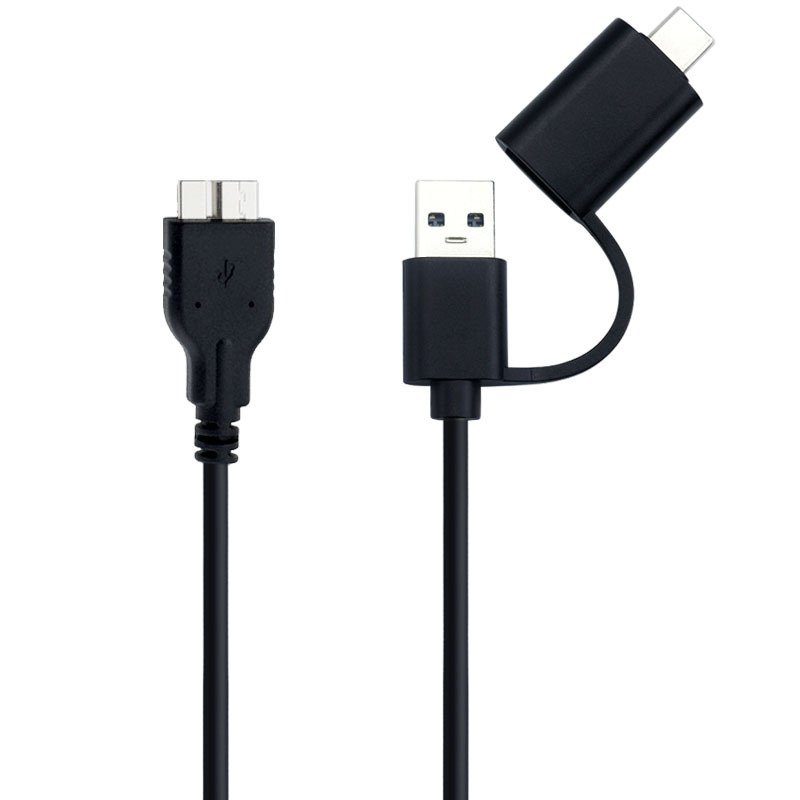
In today’s digital world, transferring data between devices is a common necessity. The micro USB to USB data transfer cable stands as a vital tool in this process. These cables facilitate the movement of files, photos, videos, and other digital content between devices such as smartphones, tablets, cameras, and computers.
The importance of reliable data transfer cannot be overstated. Whether you’re a professional transferring large files or an average user sending personal photos, the efficiency and speed of your cable significantly impact your productivity.
How Micro USB to USB Cables Work
The Technology Behind Data Transfer
Micro USB to USB cables operate using a combination of physical connections and electronic protocols. The USB protocol allows for standardized data transfer rates, with USB 2.0 supporting up to 480 Mbps and USB 3.0 reaching speeds of 5 Gbps.
When you connect your device to a computer via this cable, several things happen simultaneously. The physical connection establishes a pathway for electrical signals. The USB controller chip in your device communicates with the computer’s operating system, initiating the data transfer process.
Data Transfer Process Explained
The actual data transfer involves breaking down your files into smaller packets. These packets are then transmitted serially across the cable. Error checking mechanisms ensure data integrity, requesting retransmission of corrupted packets.
Power delivery is another crucial aspect. While transferring data, these cables can also charge your devices, thanks to the power wires within the cable that supply electricity from the USB port to your device.
Selecting the Right Data Transfer Cable
Key Factors to Consider
When choosing a micro USB to USB data transfer cable, several factors deserve your attention:
- Durability: Look for cables with reinforced connectors and braided exteriors to withstand bending and pulling.
- Speed: Opt for USB 3.0 cables if high-speed transfer is important for your workflow.
- Compatibility: Ensure the cable works with your specific devices, considering both the physical connector size and the electronic protocols.
Recommended Brands and Models
Based on user reviews and performance testing, certain brands stand out in the market. Cables from companies like Anker, Belkin, and AmazonBasics consistently deliver reliable performance.
These recommended cables often come with additional features such as LED indicators showing data transfer in progress and built-in surge protectors to prevent device damage.
Common Usage Scenarios
Transferring Media Files
For photographers and videographers, transferring large media files requires cables that can handle high data volumes efficiently. Using a high-quality micro USB to USB cable can significantly reduce transfer times compared to wireless methods.
Device Charging and Data Transfer
Many users appreciate the convenience of charging their devices while simultaneously transferring data. This dual functionality makes these cables versatile tools for both home and office environments.
Troubleshooting Connection Issues
Occasionally, you might encounter problems such as slow transfer speeds or intermittent connections. Common solutions include checking cable connections, trying different USB ports, and ensuring your devices have the latest driver updates.

Conclusion
In summary, micro USB to USB data transfer cables remain essential tools in our digital landscape. Understanding their functionality, knowing how to select the right one, and being aware of common usage scenarios empowers you to make informed decisions. As technology evolves, these cables continue to adapt, maintaining their relevance in data transfer solutions.
How to Purchase:https://looperbuy.com/search?keywords=micro+usb+to+usb+data+transfer+cable
Q&A Section
Now, let’s address some frequently asked questions about these cables:
What is the maximum data transfer speed of a standard micro USB to USB cable?
Standard micro USB to USB cables typically operate at USB 2.0 speeds, which can transfer data at up to 480 Mbps. However, various factors including cable quality, device capabilities, and file system limitations can affect the actual speed you experience. For faster transfers, consider cables supporting USB 3.0 standards.
How can I tell if my cable supports USB 3.0?
USB 3.0 cables are usually identifiable by their blue-colored connectors and the SS (SuperSpeed) logo. They have more wires inside compared to USB 2.0 cables, which enables the higher data transfer rates. However, to fully utilize USB 3.0 speeds, both your device and computer must support this standard.
Why does my data transfer sometimes pause or slow down?
Several factors can cause interruptions in data transfer. Common causes include:
- Insufficient power supply to the device during transfer
- Background processes or other applications using system resources
- Faulty cable connections or damaged cables
- Outdated device drivers or operating system issues
Troubleshooting steps include checking cable connections, closing unnecessary applications, and ensuring your devices have the latest software updates.
Are all micro USB cables suitable for data transfer?
Not all micro USB cables are created equal. While many cables can charge your devices, not all are optimized for efficient data transfer. Charging-only cables might have thinner wires or lack the necessary data transfer capabilities. Look for cables specifically labeled as data transfer cables for better performance.
How can I extend the lifespan of my micro USB to USB cable?
Proper care can significantly extend your cable’s usability:
- Avoid bending or pulling the cable excessively
- Store the cable in a loosely coiled manner rather than tightly wrapped
- Keep the cable away from sharp objects and potential hazards
- Use port protectors to prevent damage to both the cable and your device ports
Regularly inspecting your cables for signs of wear and replacing damaged ones promptly helps maintain reliable data transfers.