Table of Contents
The Ultimate Guide to Best Buy Computer Mice
Introduction
A computer mouse is an essential peripheral device for both work and entertainment. Whether you’re a casual user, a professional, or a gaming enthusiast, finding the right computer mouse can significantly enhance your productivity and user experience. With countless options available at retailers like Best Buy, this comprehensive guide will help you navigate the market and discover the best computer mice to meet your needs and budget.
Types of Computer Mice
Wired Mice
Wired mice connect directly to the computer via a USB cable, offering stable connectivity with no lag or connectivity issues. They are ideal for users who prioritize performance and reliability. For instance, the Logitech M185 is a simple yet reliable wired mouse with plug-and-play wireless functionality. It features fast data transmission and virtually no delays or dropouts, making it suitable for general office use and daily tasks.
Wireless Mice
Wireless mice eliminate the constraints of cables, providing greater freedom and mobility. They are perfect for users who frequently move their workspace or prefer a clutter-free setup. The Logitech MX Master 3S is currently one of the top wireless mice on the market. It boasts a premium ergonomic design, an 8000 DPI sensor capable of tracking on glass surfaces, and a 70-day battery life. It also features customizable buttons and supports Bluetooth and USB-C connectivity.
Gaming Mice
Gaming mice are designed specifically for gamers, featuring high DPI sensors, programmable buttons, and lightweight construction to deliver precise control and rapid responsiveness during gameplay. The SteelSeries Aerox 3 Wireless is a standout choice. Weighing less than 2.5 ounces, it offers up to 18,000 DPI and combines high sensitivity with precise stopping power. Its wireless connection is stable, and it supports both 2.4GHz wireless and Bluetooth connectivity. Additionally, it is dust and moisture-resistant and features a symmetrical design suitable for left-handed users.
Ergonomic Mice
Ergonomic mice prioritize comfort and reduce hand fatigue during extended use. They come in various shapes and designs to accommodate different hand sizes and gripping styles. The Razer Pro Click is designed as if tailored for the user’s hand. It offers quick response times and features silent mechanical switches, making it ideal for office professionals who require silent clicking. The scroll wheel can switch between notched and free-spinning modes for efficient navigation.
Vertical Mice
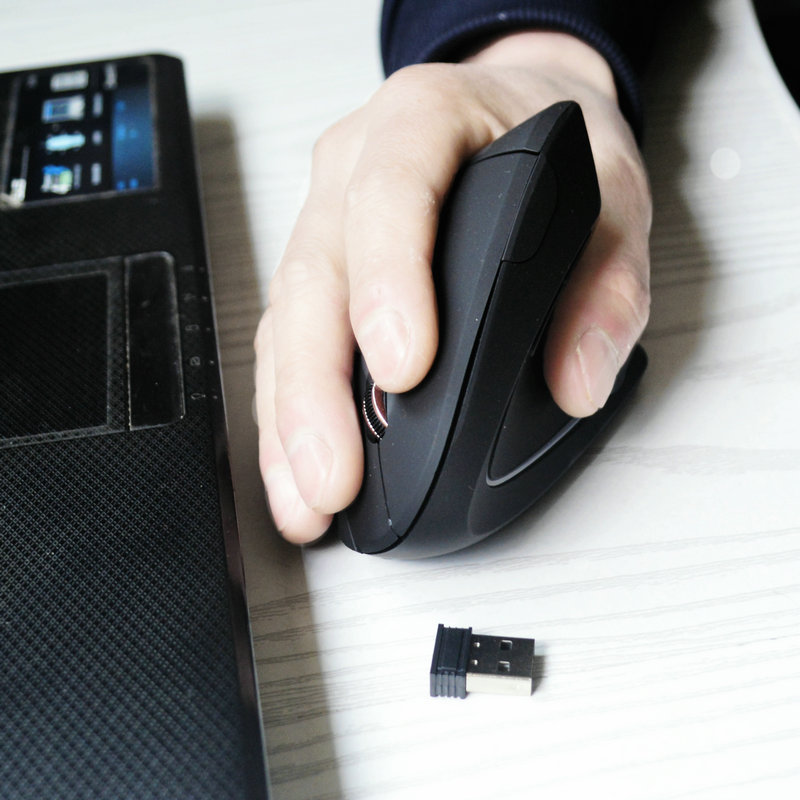
Vertical mice feature a unique vertical design that promotes a more natural wrist position, reducing the risk of wrist strain. The Logitech Lift is the most comfortable vertical mouse tested, with a size and shape suitable for various hand sizes. It allows the wrist to maintain a neutral angle and can connect to three devices via Bluetooth or a USB dongle.
Top Computer Mouse Brands
Logitech
Logitech dominates the computer mouse market with its wide range of products and excellent performance. Its MX Master series is renowned for its high DPI, customizable buttons, and ergonomic design. The Logitech MX Master 3S is the latest model in this series, offering 8000 DPI, an 8000 DPI track-anywhere sensor, and up to 70 days of battery life. It also features touch gestures and USB-C charging.
Razer
Razer is a leading brand in gaming peripherals, offering high-performance gaming mice. The Razer Basilisk V3 is designed for gaming, featuring a ergonomic right-handed shape suitable for most hand sizes and grip styles. It has more programmable buttons than other options on the market, and its sensor performance and low click latency provide an extremely responsive gaming experience.
SteelSeries
SteelSeries specializes in gaming hardware and accessories, with its gaming mice known for their lightweight design and high sensitivity. The SteelSeries Aerox 3 Wireless is a top choice for gaming mice. It weighs less than 2.5 ounces, offers up to 18,000 DPI, and combines high sensitivity with precise stopping power. Its wireless connection is stable, and it supports both 2.4GHz wireless and Bluetooth connectivity.
Microsoft
Microsoft offers a variety of computer mice catering to different user needs. The Microsoft Modern Mobile Mouse is a slim travel mouse designed for remote work. Its ambidextrous design suits both left- and right-handed users, and Microsoft’s BlueTrack technology enables smooth tracking on almost any surface.
Contour
Contour focuses on ergonomic design, with its Unimouse standing out for its hinged design and adjustable thumb rest. It has six remappable buttons, a sturdy and stylish build, and 2,800 DPI, ensuring smooth cursor navigation.
Shopping Tips for Computer Mice
Determine Your Budget
Computer mice are available at various price points. If you’re looking for a high-performance mouse for gaming or productivity, you may need to invest in a premium product like the Logitech MX Master 3S, which is relatively expensive but offers exceptional features and performance. If you’re on a tight budget, options like the Logitech M185 or Logitech M720 Triathlon are affordable while still delivering reliable performance.
Consider Your Usage Scenario
- For General Office Use: Prioritize ergonomic design, silent clicking, and comfortable handling. The Razer Pro Click is a great choice for office professionals who need silent clicking and efficient operation.
- For Gaming: Focus on high DPI sensors, programmable buttons, and lightweight construction. The SteelSeries Aerox 3 Wireless and Logitech G Pro X Superlight 2 are excellent options for gamers.
- For Travel: Consider compact size, portability, and dual-mode connectivity (Bluetooth and USB dongle). The Logitech MX Anywhere 3S and MX Anywhere 3 are ideal for travelers. The MX Anywhere 3S has a flatter, more compact shape suitable for small hands, while the MX Anywhere 3 combines the sensor and sensitivity of the MX Master 3 in a travel-friendly size.
Pay Attention to Mouse Specifications
- DPI: DPI (dots per inch) measures the mouse’s sensitivity. The higher the DPI, the faster the cursor moves across the screen. Most casual users can opt for a mouse with 1,000–3,000 DPI, while gamers may prefer mice with 5,000–32,000 DPI.
- Connectivity: Choose between wired and wireless mice based on your needs. Wired mice offer stable connectivity but lack portability, while wireless mice provide freedom but require battery charging.
- Ergonomics: Consider the mouse’s shape and design to ensure it fits comfortably in your hand and reduces hand fatigue during extended use. Ergonomic mice like the Razer Pro Click and Logitech Lift are designed to accommodate different hand sizes and gripping styles.
Conclusion
In conclusion, selecting the right computer mouse is crucial for enhancing your productivity and user experience. By understanding the types of computer mice, exploring top brands, and following shopping tips, you can find a mouse that meets your specific needs and preferences. Whether you’re a gamer, office worker, or casual user, the market offers a diverse range of computer mice to suit your requirements. Consider your budget, usage scenario, and mouse specifications to make an informed decision.
How to Purchase:https://looperbuy.com/search?keywords=buy+computer+mice
FAQs
What are the best buy computer mice?
Best Buy offers a wide selection of computer mice, including Logitech’s MX Master 3S, MX Anywhere 3S, MX Lift, M720 Triathlon, and Signature M650; Razer’s Basilisk V3 and Pro Click; SteelSeries’ Aerox 3 Wireless and Rival 600; and Contour’s Unimouse. Each model has its unique features and advantages. For instance, the Logitech MX Master 3S offers high DPI, customizable buttons, and ergonomic design, while the Signature M650 is affordable and customizable.
What are the advantages of using a computer mouse?
A computer mouse provides more precise and flexible control compared to a touchpad. It reduces hand fatigue during extended use and enhances productivity. For gamers, a high-performance mouse offers greater sensitivity and responsiveness, improving gaming performance. For office professionals, a mouse with customizable buttons and silent clicking can boost work efficiency.
How to choose the right computer mouse?
First, determine your budget and usage scenario. If you’re a gamer, prioritize high DPI sensors, programmable buttons, and lightweight construction. For office use, focus on ergonomic design, silent clicking, and comfortable handling. Next, consider mouse specifications such as DPI, connectivity, and ergonomics. Finally, explore reputable brands like Logitech and Razer to ensure quality and reliability.
What are the best computer mouse brands?
Logitech, Razer, SteelSeries, Microsoft, and Contour are some of the best computer mouse brands. Logitech offers a wide range of products with excellent performance, such as the MX Master 3S and M720 Triathlon. Razer specializes in gaming peripherals, with the Basilisk V3 being a standout option. SteelSeries is renowned for its high-performance gaming mice like the Aerox 3 Wireless. Microsoft provides reliable and versatile mice, including the Modern Mobile Mouse. Contour focuses on ergonomic design, with the Unimouse being a notable model.
What are the differences between wired and wireless computer mice?
Wired mice connect directly to the computer via a USB cable, offering stable connectivity with no lag or connectivity issues. They are ideal for users who prioritize performance and reliability. Wireless mice eliminate cable constraints, providing greater freedom and mobility. They are perfect for users who frequently move their workspace or prefer a clutter-free setup. However, wireless mice require battery charging and may occasionally experience connectivity issues.
Hot Tags:Best Buy Computer Mice;Top Computer Mouse Brands;Best Computer Mouse Models;Wireless Computer Mouse;Ergonomic Computer Mouse;Gaming Computer Mouse;Affordable Computer Mouse;High DPI Computer Mouse;Comfortable Computer Mouse;Logitech Computer Mouse