Table of Contents
Introduction
In the ever – evolving landscape of technology, the USB Type-C charging cable has emerged as a transformative standard for connecting and powering devices. This article aims to serve as an exhaustive resource for anyone seeking to understand the intricacies, advantages, and practical applications of USB Type-C charging cables. Whether you’re a tech enthusiast, a professional, or simply a consumer looking to make informed decisions about your devices, this guide will equip you with comprehensive knowledge about USB Type-C technology.
Understanding USB Type-C

The Birth and Evolution of USB Type-C
USB Type-C, often abbreviated as USB-C, made its debut in 2014 as the latest evolution in USB connector technology. Developed by the USB Implementers Forum (USB – IF), a group of industry leaders including Apple, HP, Intel, Microsoft, and Samsung, USB-C was designed to address the limitations of previous USB connectors and meet the growing demands of modern devices. Unlike its predecessors such as USB-A and USB-B, USB-C was crafted with a focus on versatility, power efficiency, and high – speed data transfer.
The development of USB-C was driven by several key factors. The proliferation of ultra – thin devices like smartphones, tablets, and laptops necessitated a smaller, more space – efficient connector. Additionally, the increasing variety of functionalities demanded by users, such as high – resolution video output and rapid charging, required a connector capable of higher power delivery and data transfer rates. USB-C was engineered as a future – proof solution that could adapt to the advancing technological landscape.
The Anatomy of a USB Type-C Connector
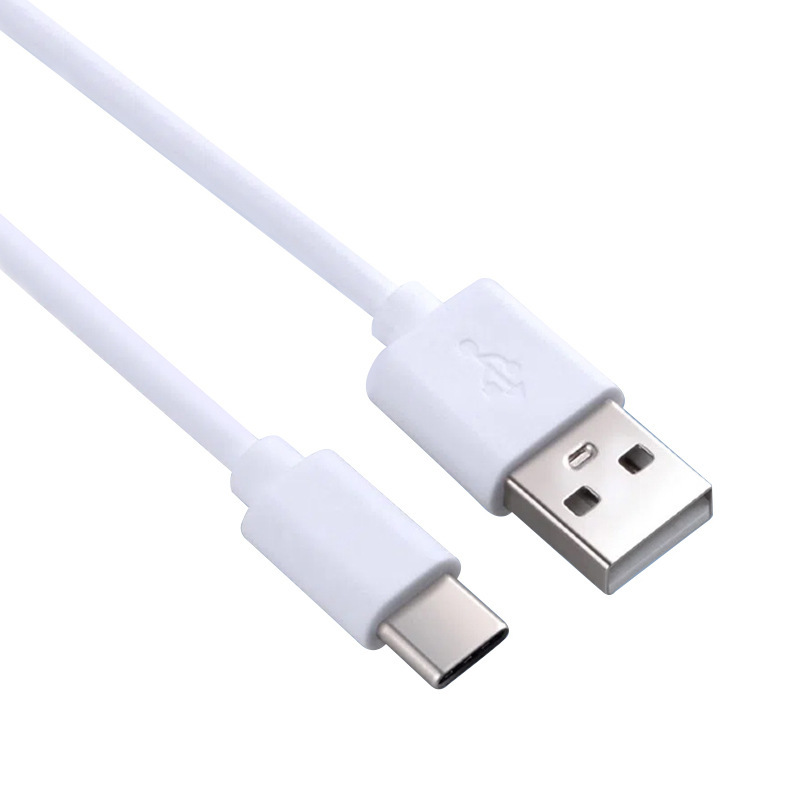
At first glance, the USB-C connector stands out for its distinctive oval shape and symmetrical design. This thoughtful design allows for easy insertion into ports, eliminating the common frustration of trying to determine the correct orientation. The connectors are also considerably smaller than USB-A connectors, with dimensions of approximately 8.4 millimeters by 2.6 millimeters, making them well – suited for today’s compact devices.
Inside the sleek exterior of a USB-C connector lies a complex array of pins and circuits that enable its diverse functionalities. The pin layout of USB-C supports various modes and protocols, allowing it to carry different types of data and power simultaneously. This technical sophistication is what empowers USB-C to deliver on its wide – ranging promises of performance and versatility.
Advantages of USB Type-C Charging Cables
Universal Compatibility
One of the most celebrated features of USB Type-C is its universal compatibility. USB-C ports can be found on a wide array of devices, including but not limited to smartphones, tablets, laptops, digital cameras, gaming consoles, and audio equipment. This universality means that a single USB-C charging cable can serve multiple devices, reducing the clutter of multiple cables and the stress of trying to match the right cable to the right device.
For travelers and individuals on the go, this compatibility is a game – changer. No longer is it necessary to carry a different charging cable for each device; a single USB-C cable can power your phone, charge your laptop, and connect your camera, all from the same port. This simplification of the charging process enhances convenience and efficiency in our increasingly mobile lives.
Reversible Plug Orientation
The reversible plug orientation of USB-C is a small yet remarkably user – friendly innovation. Unlike USB-A cables, which require the user to determine the correct orientation before plugging them in, USB-C cables can be inserted either way. This eliminates the trial – and – error process of connecting devices and prevents the minor frustrations that accumulate in daily tech use. It’s a design choice that reflects a deep understanding of user experience and a commitment to making technology more intuitive.
Faster Data Transfer Speeds
USB-C cables are capable of supporting data transfer speeds that far exceed those of previous USB standards. With USB 3.2 (also known as USB 3.1 Gen 2), USB-C can achieve transfer speeds of up to 10 Gbps (gigabits per second). When paired with USB4 technology, which is based on Thunderbolt 3 specifications, this speed can soar to an impressive 40 Gbps. These rapid transfer rates make USB-C the go – to choice for transferring large files such as high – resolution images, videos, and software applications.
For professionals who work with large data sets, such as video editors, graphic designers, and software developers, the faster data transfer speeds of USB-C translate into significant time savings and improved workflow efficiency. Transferring a 4K video file that might have taken several minutes with an older USB standard can now be accomplished in a matter of seconds, allowing for more productive use of time.
Higher Power Delivery
USB-C charging cables support USB Power Delivery (USB PD), a protocol that enables higher power output than previous USB standards. USB PD can deliver up to 100 watts of power, which is sufficient to charge high – power devices like laptops, monitors, and even some desktop components. This capability has led to the rise of USB – C – powered laptops and the potential for a single cable to serve as both a data transfer and charging solution.
The higher power delivery also means faster charging speeds for compatible devices. Smartphones and tablets equipped with USB – C ports and supporting fast – charging technologies can recharge their batteries in a fraction of the time required by older USB standards. For users who rely on their devices throughout the day and need them to be constantly powered, this faster charging is a substantial advantage.
Support for Multiple Protocols
USB-C’s advanced architecture allows it to support multiple protocols through a feature called Alternate Mode. This means that a single USB-C cable can transmit different types of signals, such as DisplayPort, HDMI, and Thunderbolt 3, in addition to USB signals. This versatility enables innovative applications like connecting a laptop to an external display via a USB-C cable, eliminating the need for separate video cables.
For creative professionals who require high – resolution displays for their work, the ability to output video through USB-C simplifies their setup and enhances their productivity. Similarly, gamers can appreciate the potential for connecting high – performance peripherals through a single port, streamlining their gaming rigs and reducing cable management challenges.
How USB Type-C Charging Cables Work
The Role of the USB – C Connector
The USB-C connector plays a pivotal role in the functionality of the charging cable. Its design allows for the transmission of power, data, and video signals through a single port. The connector’s pins are engineered to handle the various protocols and power levels required by different devices. When a USB-C cable is connected to a device, the connector establishes communication with the device’s USB controller to negotiate power requirements and data transfer capabilities.
This intelligent communication between the cable and the device ensures that the appropriate amount of power is delivered and that data transfer occurs at the maximum possible speed supported by both the cable and the device. The USB-C connector’s ability to adapt to different scenarios is a key factor in its versatility and effectiveness as a charging and data transfer solution.
Power Delivery Mechanism
The power delivery mechanism in USB-C cables is governed by the USB Power Delivery specification. When a USB-C cable is connected to a power source and a device, the source and the device exchange information about their power capabilities. This negotiation process determines the voltage, current, and power level that will be supplied.
USB PD operates on the principle of adjustable voltage sources. The power source can provide a range of voltages (from 5V up to 20V) and currents (up to 5A), allowing for flexible power delivery. The device draws only the power it needs, which helps optimize energy usage and prevent over – charging. This intelligent power management not only speeds up charging times but also contributes to the longevity of device batteries by avoiding excessive power input.

Data Transfer Process
Data transfer over USB-C cables occurs through a process that leverages the advanced capabilities of the USB protocol. When data is sent from one device to another via a USB-C cable, it is broken down into packets. These packets are then transmitted over the cable’s data lines and reassembled at the receiving end.
The speed of data transfer depends on several factors, including the version of the USB protocol being used (such as USB 3.2 or USB4), the quality of the cable, and the capabilities of the connected devices. Higher – speed USB protocols allow for larger data packets to be transmitted more quickly, resulting in faster overall transfer times. The USB-C cable’s construction, including the quality of its conductors and shielding, also plays a role in ensuring reliable and fast data transfer.
Choosing the Right USB Type-C Charging Cable
Factors to Consider
Selecting the appropriate USB-C charging cable involves considering several key factors to ensure it meets your specific needs. First and foremost is the cable’s compatibility with your devices. Not all USB-C cables are created equal, and some may only support basic charging and data transfer functions, while others are certified for higher – speed data transfer or higher power delivery.
The length of the cable is another important consideration. For most desktop setups, a shorter cable (around 1 – 2 feet) is sufficient and helps reduce clutter. However, for charging devices placed further away from power sources, such as in a living room or across a large workspace, a longer cable (6 – 10 feet) may be necessary. It’s important to balance the need for length with the potential for signal loss over longer distances, which can affect data transfer speeds and charging efficiency.
Durability is a factor that should not be overlooked. USB-C cables are subject to frequent plugging and unplugging, which can lead to wear and tear over time. Look for cables with reinforced connectors and durable outer materials such as braided nylon, which can withstand bending and pulling better than standard PVC – coated cables. Additionally, the build quality of the cable, including the strain relief at the connector ends, can significantly impact its lifespan.
Certified vs. Non – Certified Cables
When shopping for USB-C cables, you may come across products labeled as “USB – IF Certified.” This certification indicates that the cable has undergone rigorous testing by the USB Implementers Forum to ensure it meets the USB specifications for performance, safety, and compatibility. Certified cables are less likely to cause issues such as overheating, electrical shorts, or damage to your devices.
Non – certified cables, while often available at lower prices, carry a higher risk of being sub – standard. They may not support the full range of USB – C features, such as high – speed data transfer or high – power delivery, and could potentially harm your devices or pose safety hazards. Investing in a certified USB-C cable is a wise decision that protects both your devices and your peace of mind.
Recommended Cable Brands
Several brands are well – regarded in the market for producing high – quality USB-C charging cables. Apple offers a range of USB-C cables that are optimized for use with their devices, ensuring seamless integration and reliable performance. Anker is another popular choice, known for their durable cables that support fast charging and come with useful features like tangle – free designs and lengthy warranties.
Belkin provides cables with a focus on both functionality and aesthetics, making them suitable for various user environments. AmazonBasics offers more affordable options without compromising too much on quality, though it’s advisable to check user reviews to ensure the specific model meets your requirements. These brands, among others like Google and Samsung, have established reputations for producing cables that adhere to USB specifications and deliver on their promised features.
Applications of USB Type-C Charging Cables
In Personal Computing
USB-C cables have revolutionized the way we interact with personal computing devices. Modern laptops, especially ultrabooks and premium models, widely adopt USB-C ports for their slim profiles and multifunctional capabilities. These ports serve as charging inputs, data transfer interfaces, and video output connections, reducing the number of ports needed on the device and allowing for thinner, more elegant designs.
The ability to charge a laptop via USB-C has also led to more flexible power solutions. Many laptop manufacturers now offer USB-C power adapters that are smaller and lighter than traditional laptop chargers. This makes traveling with a laptop more convenient, as the power adapter takes up less space in a bag and can often be used across different devices, provided they support USB – C charging.
In Mobile Devices
Smartphones and tablets have been quick to embrace USB-C technology. The reversible plug orientation and faster charging speeds have become expected features for many users. Android devices, in particular, have widely adopted USB-C as the standard charging and data transfer interface. Even Apple, known for their Lightning connector, has begun transitioning to USB-C in some of their iPad models and, with the release of the iPhone 15, has finally made the switch to USB-C, signaling a unified charging standard across the industry.
The higher power delivery supported by USB – C also enables features like reverse charging, where a smartphone can be used to charge other devices like wireless earbuds or even another phone. This added functionality enhances the utility of mobile devices and provides users with more flexibility in managing their tech ecosystem.
In Audio and Visual Equipment
The audio and visual sectors have also benefited significantly from USB-C technology. High – resolution audio devices, such as DACs (Digital – to – Analog Converters) and premium headphones, utilize USB-C for its ability to deliver high – quality, low – latency audio signals. This makes USB-C a favorite among audiophiles seeking the best possible sound quality from their digital music files.
In the world of video production and consumption, USB-C’s support for high – definition video output via protocols like DisplayPort and HDMI has made it a staple in connecting cameras, laptops, and streaming devices to external displays and recording equipment. Content creators can now capture, edit, and output high – quality video using a single cable type, streamlining their workflow and reducing the potential for connection errors.
Troubleshooting Common Issues with USB Type-C Charging Cables
Charging Problems
If you’re experiencing charging issues with your USB – C cable, there are several potential causes to investigate. First, ensure that the cable is securely connected to both the power source and the device. A loose connection can interrupt the power flow and result in slow or interrupted charging. Check the connectors for any visible damage such as bent pins or frayed cables, as physical damage can prevent the cable from functioning properly.
The power source itself may be the issue. Test the cable with a different power adapter or charging port to rule out a faulty power source. Some USB – C devices require specific power profiles or fast – charging protocols to charge efficiently. If your cable or power adapter doesn’t support these protocols, the device may charge slowly or not at all. Consult your device’s specifications to determine its charging requirements and ensure your cable and adapter meet those standards.
Data Transfer Issues
Data transfer problems with USB – C cables can be equally frustrating. If files aren’t transferring correctly or the transfer speed is slower than expected, start by verifying that both the cable and the connected devices support the desired USB version (such as USB 3.2 or USB4). A cable rated only for USB 2.0 will severely limit data transfer speeds even if the devices are capable of higher speeds.
Corrupted files can sometimes be the result of interrupted data transfers. Ensure that the cable remains securely connected throughout the transfer process and that neither device enters sleep mode or experiences power fluctuations. In some cases, software issues on the device can interfere with data transfer. Updating the device’s USB drivers or operating system may resolve compatibility issues and improve data transfer performance.
Connection Errors with Peripherals
When connecting peripherals like external hard drives, monitors, or audio devices via USB – C, you may encounter connection errors. These errors can stem from a variety of sources. First, confirm that the USB – C port on both the device and the peripheral supports the necessary Alternate Mode for the desired function (such as video output or audio transmission). Not all USB – C ports are created equal, and some may only support charging and basic data transfer.
Driver incompatibility is another common culprit. Many peripherals require specific drivers to function correctly with your computer or device. Visit the peripheral manufacturer’s website to download and install the latest drivers for your device. Restarting your computer or peripheral can also sometimes resolve connection issues by refreshing the USB connection and loaded drivers.
The Future of USB Type-C
Industry Adoption and Standardization
The future of USB – C looks extremely promising, with widespread industry adoption and ongoing standardization efforts. As more device manufacturers recognize the advantages of USB – C and align with the USB specifications set by the USB – IF, we can expect to see an even broader range of devices incorporating USB – C ports. This standardization will further enhance the universal compatibility that USB – C is known for, making it the de facto connection standard across the tech industry.
The European Union has already taken steps toward standardizing USB – C as the common charging solution for mobile devices, a move that is likely to have ripple effects across global markets. As regulatory bodies and industry groups continue to push for unified standards, the prevalence and utility of USB – C will only continue to grow, benefiting consumers through increased convenience and reduced e – waste.
Advancements in USB4 and Thunderbolt Integration
Looking ahead, the integration of USB4 and Thunderbolt technologies will drive the performance capabilities of USB – C to new heights. USB4, which is based on the Thunderbolt 3 protocol, promises data transfer speeds of up to 40 Gbps, with future iterations potentially offering even faster speeds. This advancement will be particularly impactful for professional users who work with large data sets, 4K and 8K video editing, and other bandwidth – intensive applications.
The collaboration between USB and Thunderbolt technologies also opens up new possibilities for cross – device compatibility and functionality. As these technologies mature and become more accessible, we can anticipate innovative use cases that further blur the lines between different device types and connection standards, creating a more seamless and powerful user experience.
Potential New Applications and Innovations
As USB – C technology evolves, new applications and innovations are sure to emerge. One exciting area is the development of USB – C – based power banks and portable charging solutions. With USB – C’s higher power delivery capabilities, these power banks can now charge a wider range of devices, including laptops and tablets, in addition to smartphones. This makes them invaluable for travelers and individuals who need to stay powered on the go.
Another potential innovation is the expansion of USB – C in the Internet of Things (IoT) ecosystem. Smart home devices, wearables, and other IoT gadgets could increasingly adopt USB – C for charging and data transfer, given its small form factor and versatile capabilities. This would contribute to a more interconnected and cohesive smart home environment, where all devices can be managed and powered through a common interface.
Conclusion
USB Type-C charging cables have become indispensable tools in our tech – driven world, offering a multitude of advantages that previous USB standards simply couldn’t match. Their universal compatibility, reversible design, lightning – fast data transfer speeds, and robust power delivery capabilities have positioned them as the future of device connectivity. As technology continues to advance and USB specifications evolve, USB – C will likely remain at the forefront, continually enhancing the way we power, connect, and transfer data between our devices.
When selecting a USB – C charging cable, it’s crucial to consider factors like compatibility, length, durability, and certification to ensure you get a product that meets your needs and stands the test of time. With the right USB – C cable, you can simplify your tech setup, enjoy faster charging and data transfer, and connect to a wider array of devices than ever before.
How to Purchase:https://looperbuy.com/search?keywords=what+is+usb+type+c+charging+cable
Frequently Asked Questions
Q: Can I use a USB – C cable with my older USB – A devices?
A: Yes, you can use a USB – C cable with older USB – A devices by using an adapter or a cable that has a USB – C connector on one end and a USB – A connector on the other. This allows for backward compatibility, though you may not benefit from the full range of USB – C features like faster charging or higher – speed data transfer when connected to USB – A ports.
Q: Are all USB – C cables the same in terms of performance?
A: No, not all USB – C cables are the same. Performance can vary based on the cable’s certification, construction quality, and supported USB version. Some cables may only support basic charging and low – speed data transfer, while others are certified for fast charging, high – speed data transfer (up to 40 Gbps with USB4), and video output. Always check the cable’s specifications to ensure it meets your needs.
Q: How can I tell if my USB – C cable supports fast charging?
A: To determine if your USB – C cable supports fast charging, check the cable’s packaging or specifications for terms like “USB Power Delivery” (USB PD) or specific fast – charging protocols (e.g., Qualcomm Quick Charge, Samsung Adaptive Fast Charging). Certified cables will often display USB – IF certification marks or indicate supported power levels (e.g., up to 60W or 100W). You can also test the cable by charging a device that supports fast charging and monitoring the charging speed; if it charges significantly faster than with a standard cable, it likely supports fast charging.
Q: Why is my USB – C cable not transferring data at the expected speed?
A: If your USB – C cable isn’t transferring data at the expected speed, several factors could be at play. First, ensure that both the cable and the connected devices support the desired USB version (e.g., USB 3.2 or USB4). A cable rated for USB 2.0 will limit transfer speeds to that standard, even if the devices are capable of higher speeds. Check for physical damage to the cable, as this can disrupt data transmission. Also, outdated USB drivers on your computer can sometimes cause data transfer issues; updating the drivers may resolve the problem. Finally, verify that the devices aren’t experiencing overheating or power issues, which can slow down data transfer as a protective measure.
Q: Is it safe to use third – party USB – C cables with my device?
A: Using third – party USB – C cables can be safe if the cable is certified and meets the necessary quality standards. Look for cables with USB – IF certification, as these have undergone testing to ensure they meet USB specifications for performance and safety. Avoid cables from unknown or uncertified manufacturers, as they may not support the full range of USB – C features and could potentially damage your device or pose safety risks like overheating or electrical shorts. Reading customer reviews and purchasing from reputable retailers can also help ensure you’re getting a safe and reliable cable.
Hot Tags: What Is Usb Type C Charging Cable; Usb Type C Benefits; Usb Type C Vs Other Usb Standards; Fast Charging With Usb Type C; Usb Power Delivery; Usb Type C Data Transfer Speeds; Usb Type C Compatibility; Usb Type C Cable Length And Durability; Certified Usb Type C Cables; Usb Type C Future Trends