In the world of data centers, where efficiency and organization are paramount, effective cable management is often overlooked. However, the way cables are organized within a data rack can significantly impact the overall performance, maintenance, and longevity of the equipment housed within. This article delves into the importance of data rack cable management, exploring best practices, tools, and techniques that can help streamline operations and enhance the functionality of your data center.
Table of Contents
Understanding Data Rack Cable Management
What is Data Rack Cable Management?
Data rack cable management refers to the systematic organization of cables within a data rack. This includes the arrangement of power cords, network cables, and other types of wiring that connect various devices. Proper cable management not only improves the aesthetic appeal of a data center but also enhances airflow, reduces the risk of cable damage, and simplifies troubleshooting and maintenance. By ensuring that cables are neatly arranged and easily accessible, data center operators can significantly reduce the time spent on maintenance tasks, allowing for more efficient operations.
Why is Cable Management Important?
The importance of cable management in a data center cannot be overstated. Poorly managed cables can lead to several issues, including:
– Overheating: Cables that are tangled or improperly routed can obstruct airflow, leading to overheating of equipment. This can cause servers to throttle performance or, in severe cases, shut down to prevent damage.
– Downtime: Disorganized cables make it difficult to identify and resolve issues quickly, resulting in increased downtime. In a business environment, even a few minutes of downtime can lead to significant financial losses and impact customer satisfaction.
– Damage to Cables: Cables that are not secured properly are at risk of being damaged, which can lead to costly repairs and replacements. Damaged cables can also result in data loss or corruption, further complicating recovery efforts.
– Inefficiency: A cluttered environment can slow down operations and make it challenging to add or remove equipment. This inefficiency can hinder the scalability of the data center, making it difficult to adapt to changing business needs.
Best Practices for Data Rack Cable Management
Planning Your Cable Layout
Before installing cables, it is essential to plan the layout carefully. Consider the following factors:
– Cable Types: Different cables have different requirements. For instance, power cables should be kept separate from data cables to avoid interference. This separation helps maintain signal integrity and reduces the risk of electromagnetic interference (EMI).
– Future Expansion: Anticipate future needs by leaving space for additional cables and equipment. Planning for growth can save time and resources in the long run, as it minimizes the need for major reconfigurations.
– Accessibility: Ensure that cables are routed in a way that allows easy access for maintenance and troubleshooting. This accessibility is crucial for minimizing downtime during repairs or upgrades.
Using Cable Management Tools
There are various tools and accessories available to aid in effective cable management:
– Cable Ties and Velcro Straps: These are essential for bundling cables together and keeping them organized. Velcro straps are particularly useful because they can be adjusted easily and reused, making them a sustainable choice.
– Cable Trays: These trays can be mounted on the sides or the back of racks to hold cables securely. They help keep cables off the floor and out of the way, reducing the risk of tripping hazards and damage.
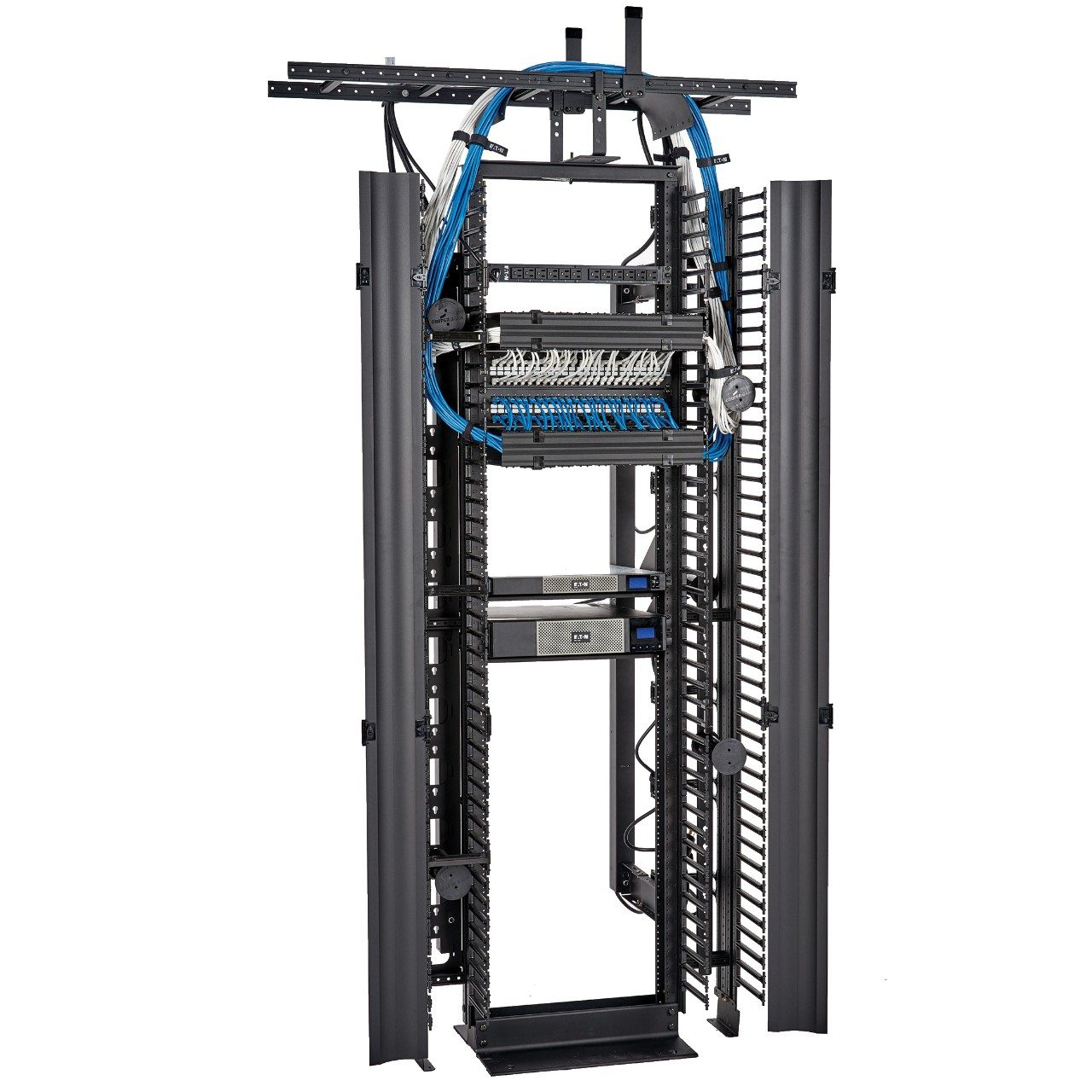
– Vertical and Horizontal Cable Managers: These devices help route cables neatly along the sides of racks, preventing tangling and obstruction. They also provide a clean appearance, which can enhance the overall professionalism of the data center.
Color Coding Cables
Color coding cables can significantly enhance organization. By using different colors for different types of cables, technicians can quickly identify connections and troubleshoot issues. For example, using blue for network cables and yellow for power cables can streamline the maintenance process. This visual differentiation not only speeds up troubleshooting but also helps new staff quickly understand the layout of the data center.

Techniques for Effective Cable Management
Routing Cables Properly
Proper routing of cables is crucial for maintaining airflow and preventing damage. Here are some techniques to consider:
– Vertical Routing: Use vertical cable managers to route cables from top to bottom, which helps maintain a clean look and improves airflow. This method allows hot air to rise and escape more easily, reducing the risk of overheating.
– Horizontal Routing: For cables that need to run horizontally, use horizontal cable management panels to keep them organized and out of the way. This organization prevents cables from sagging or becoming tangled, which can lead to wear over time.
Regular Maintenance
Regular maintenance is vital for ensuring that cable management remains effective over time. Schedule periodic checks to:
– Inspect cables for wear and tear. Regular inspections can help identify potential issues before they become serious problems, allowing for proactive maintenance.
– Reorganize cables that may have become tangled or disorganized. As equipment is added or removed, cables can shift, necessitating a reevaluation of the layout.
– Update color coding or labeling as necessary. Keeping labels current ensures that anyone working in the data center can quickly identify the purpose of each cable.
Documenting Your Setup
Keeping a detailed record of your cable management setup can be invaluable. Documenting the layout, including which cables connect to which devices, can save time during troubleshooting and maintenance. This documentation should be updated whenever changes are made to the setup. A well-maintained record can also assist in training new staff, providing them with a clear understanding of the data center’s infrastructure.
The Role of Technology in Cable Management
Automated Cable Management Systems
With advancements in technology, automated cable management systems are becoming more common in data centers. These systems can monitor cable performance, detect issues, and even adjust cable routing automatically to optimize airflow and reduce overheating. By integrating these systems, data centers can achieve a higher level of efficiency and reliability, minimizing the risk of human error.
Software Solutions
There are various software solutions available that can assist in managing data center infrastructure, including cable management. These tools can help visualize cable layouts, track changes, and provide alerts for potential issues. By utilizing software, data center managers can gain insights into cable performance and make informed decisions about upgrades or reconfigurations.
Conclusion
Effective data rack cable management is essential for the smooth operation of any data center. By implementing best practices, utilizing the right tools, and maintaining a systematic approach, organizations can enhance their operational efficiency, reduce downtime, and prolong the life of their equipment. As technology continues to evolve, staying informed about the latest cable management solutions will be crucial for maintaining a competitive edge in the data center industry. A well-organized data center not only improves performance but also contributes to a safer and more productive working environment.
How to purchase:https://looperbuy.com/search?keywords=data+rack+cable+management
Frequently Asked Questions
1. What are the benefits of cable management in a data center?
Cable management improves airflow, reduces the risk of overheating, minimizes downtime, and enhances the overall organization of the data center. A well-managed cable system can also lead to easier troubleshooting and maintenance, ultimately saving time and resources.
2. How often should I check my cable management setup?
It is advisable to conduct regular checks at least once every few months, or more frequently if your data center experiences high traffic or frequent changes. Regular maintenance helps ensure that cables remain organized and functional.
3. Can I use any type of cable ties for cable management?
While you can use various types of cable ties, it is best to choose those that are designed for data center use, such as Velcro straps, which are adjustable and reusable. This choice helps maintain flexibility and reduces waste.
4. What should I do if I find damaged cables?
If you discover damaged cables, replace them immediately to prevent potential data loss or equipment failure. Document the change in your cable management records to maintain an accurate overview of your setup.
5. How can I improve airflow in my data rack?
To improve airflow, ensure that cables are routed neatly and do not obstruct vents. Use vertical and horizontal cable management tools to keep cables organized and out of the way, allowing for optimal cooling and performance.