In today’s fast-paced digital world, the ability to charge devices while simultaneously using them for data transfer has become increasingly important. This capability is particularly relevant for smartphones and tablets that utilize USB On-The-Go (OTG) technology. In this article, we will explore the devices that support simultaneous charging and OTG functionality, the technology behind it, practical applications for users, and tips for maximizing your experience with these features.
Table of Contents
Understanding USB OTG
USB On-The-Go (OTG) allows devices like smartphones and tablets to act as a host for other USB devices such as keyboards, mice, and external storage. This means that users can connect peripherals directly to their mobile devices without needing a computer. However, one of the challenges with OTG is that many devices cannot charge while in this mode due to hardware limitations.
The Challenge of Simultaneous Charging and OTG
When a device is in OTG mode, it typically disables its charging circuit to prevent power from flowing back into the device. This can lead to rapid battery drain when using power-hungry peripherals. The need for simultaneous charging and data transfer has led to the development of various solutions, including specialized cables and adapters.
Devices That Support Charging and OTG Simultaneously
While many devices struggle with this functionality, several models have been identified as capable of supporting both charging and OTG at the same time:
– Samsung Galaxy S10 and S20 Series: These models can utilize specific OTG adapters that allow for simultaneous charging while connected to peripherals.
– Google Pixel 2 XL: Known for its versatility, this device can also handle charging and data transfer simultaneously when paired with compatible accessories.
– Motorola G31: Users have reported success in achieving simultaneous charging and OTG functionality with this model.
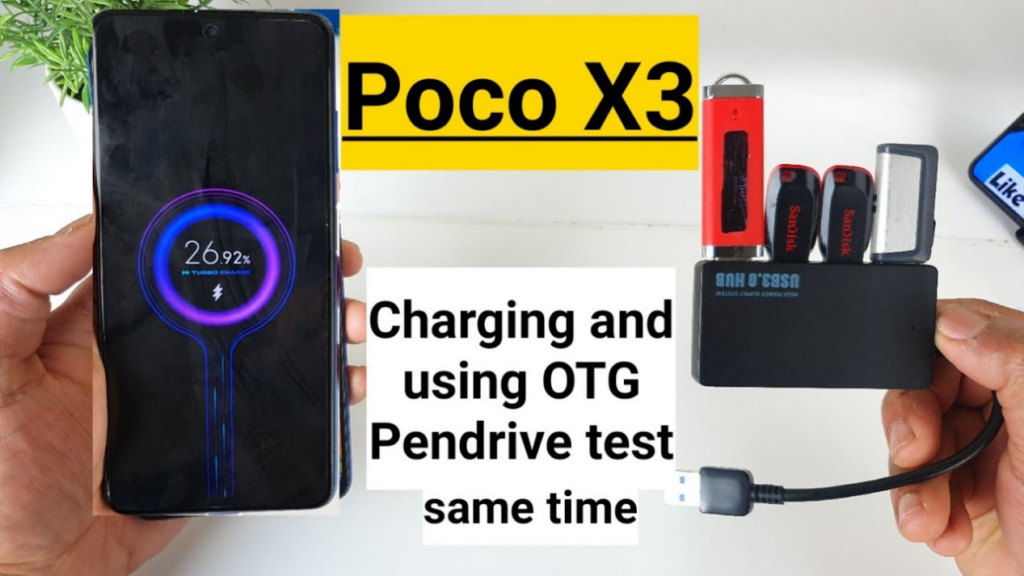
– Poco X3: This device has been confirmed by users to support both features without issues.
– Samsung Galaxy Note Series (Note 8, Note 10+): These devices can charge wirelessly while using OTG connections.
Additional Models Supporting Simultaneous Charging
Beyond the aforementioned models, several other smartphones have also been recognized for their ability to handle both charging and OTG:
– OnePlus 8T: This device features a robust battery management system that allows for effective power distribution while using OTG.
– Xiaomi Mi 10: Users have reported successful experiences connecting USB drives while keeping their devices charged.
– Asus ROG Phone 5: Designed with gamers in mind, this phone supports simultaneous charging during intense gaming sessions with external controllers.
Technology Behind Simultaneous Charging
SimulCharge Technology
One of the most innovative solutions available is *SimulCharge*, developed by LAVA. This technology allows devices to remain in USB host mode while receiving power through an adapter. This means that users can charge their devices while still having access to data from connected peripherals.
The SimulCharge technology works by modifying how power is routed through the USB connection, allowing both charging and data transfer to occur simultaneously without engaging the device’s battery. By utilizing this technology, users can enjoy uninterrupted functionality without worrying about battery life.
Custom Solutions
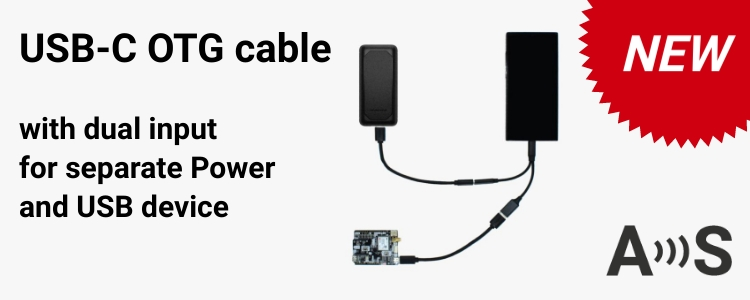
For those whose devices do not support simultaneous charging natively, custom solutions such as Y-cables or specific adapters can be used. These cables typically have separate connectors for power input and data output, allowing users to connect their devices to power while also connecting peripherals.
Using a Y-cable can be particularly beneficial when connecting high-power devices such as external hard drives or when using multiple peripherals at once. However, it’s essential to ensure that the cable is compatible with your device’s specifications to avoid any potential damage or performance issues.
Practical Applications of Charging and OTG Functionality
The ability to charge while using OTG has numerous practical applications:
– Photography: Photographers can connect their cameras to smartphones or tablets for direct image transfers while keeping their device charged during long shoots. This feature is particularly useful during events like weddings or outdoor shoots where access to power outlets may be limited.
– Gaming: Gamers can connect controllers or keyboards to their mobile devices without worrying about battery life during extended gaming sessions. This capability enhances the gaming experience by allowing for more immersive gameplay without interruptions due to low battery warnings.
– Data Transfer: Professionals who need to transfer large files from USB drives or external hard drives can do so without depleting their device’s battery. This is especially useful for individuals who work on-the-go and need quick access to files stored on external media.
– Music Production: Musicians can connect MIDI controllers or audio interfaces while keeping their devices charged. This allows for uninterrupted music production sessions without the fear of running out of battery mid-recording.
– Office Productivity: Business professionals can use keyboards and mice connected via OTG while keeping their smartphones charged during presentations or meetings. This setup allows for a more seamless workflow when working remotely or in a hybrid office environment.
Tips for Maximizing Your Experience
To get the most out of your smartphone’s charging and OTG capabilities, consider these tips:
– Choose Quality Accessories: Invest in high-quality OTG cables and adapters designed specifically for your device model. Poor-quality accessories may not support simultaneous charging effectively.
– Check Device Compatibility: Before purchasing any accessories, verify that they are compatible with your specific smartphone model to avoid any functionality issues.
– Monitor Battery Usage: Keep an eye on your battery levels when using multiple peripherals simultaneously. Some high-power devices may still drain your battery faster than it charges.
– Use Power Banks: If you frequently use your device in OTG mode, consider carrying a portable power bank. This way, you can ensure your device remains powered even during extensive usage periods.
– Stay Updated on Software: Regularly update your smartphone’s software as manufacturers often release updates that improve compatibility with accessories and enhance overall performance.
Conclusion
As mobile technology continues to evolve, the demand for features like simultaneous charging and OTG will only grow. While many devices currently support these functionalities, advancements in adapter technology such as LAVA’s SimulCharge are paving the way for broader compatibility across various models.
For users seeking a seamless experience between charging and peripheral connectivity, it’s essential to choose compatible devices or invest in high-quality adapters designed for this purpose. With these advancements, users can enjoy enhanced productivity, gaming experiences, and creative opportunities without compromising on battery life.
How To Purchase:https://looperbuy.com/search?keywords=phones+that+can+charge+and+otg+at+the+same+time
FAQs
1. What is USB OTG?
– USB On-The-Go (OTG) allows mobile devices to act as hosts for other USB peripherals, enabling direct connections without a computer.
2. Which phones support simultaneous charging and OTG?
– Some notable models include Samsung Galaxy S10/S20 series, Google Pixel 2 XL, Motorola G31, Poco X3, OnePlus 8T, Xiaomi Mi 10, Asus ROG Phone 5, and Samsung Galaxy Note series.
3. What is SimulCharge technology?
– SimulCharge is a technology developed by LAVA that enables mobile devices to charge while simultaneously accessing data from connected peripherals.
4. Can I use any OTG cable for charging?
– Not all OTG cables support simultaneous charging; it’s essential to use cables specifically designed for that purpose or those that incorporate Y-cable designs.
5. What are some practical uses for charging while using OTG?
– Practical uses include photography (transferring images), gaming (connecting controllers), data transfers from external drives, music production (connecting MIDI controllers), and office productivity (using keyboards/mice).